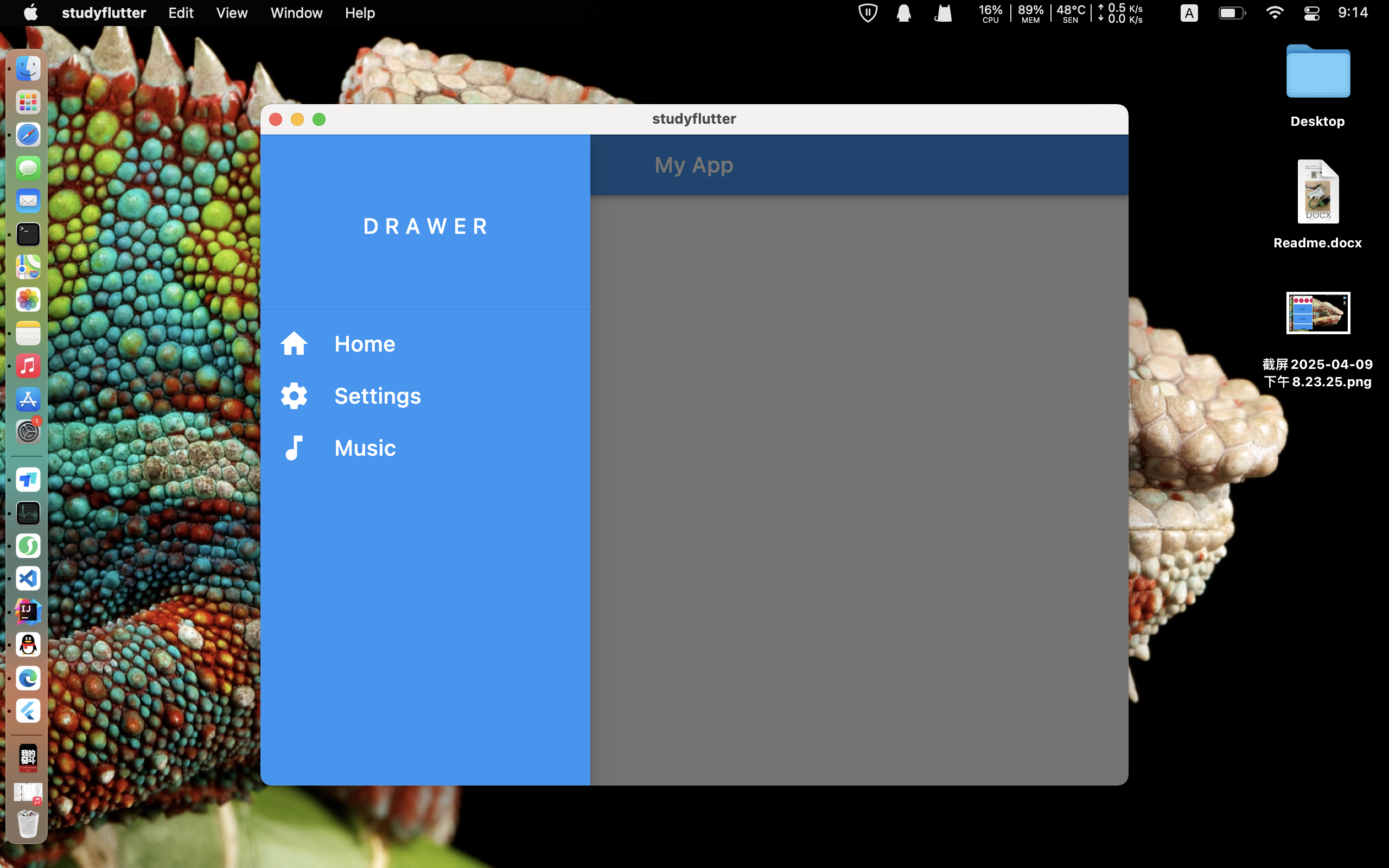
(Flutter) 侧边导航栏的实现
跟着视频敲了几天到今天开始有了一些手感,能自己独立完成部分代码了
CODE
import 'package:flutter/material.dart';

void main() {
  return runApp(MyApp());
}

class MyApp extends StatelessWidget {
  const MyApp({Key? key}) : super(key: key);

  @override
  Widget build(BuildContext context) {
    return MaterialApp(
      debugShowCheckedModeBanner: false,
      home: MyHomePage(),
    );
  }
}

class MyHomePage extends StatefulWidget {
  const MyHomePage({Key? key}) : super(key: key);

  @override
  State<MyHomePage> createState() => _MyHomePageState();
}

class _MyHomePageState extends State<MyHomePage> {
  void onPressed() {
    print('Button Pressed');
  }

  void onTap_Home() {
    Navigator.of(context).push(MaterialPageRoute(builder: (context) => Home()));
  }

  void onTap_Settings() {
    Navigator.of(context)
        .push(MaterialPageRoute(builder: (context) => Settings()));
  }

  void onTap_Music() {
    Navigator.of(context)
        .push(MaterialPageRoute(builder: (context) => Music()));
  }

  @override
  Widget build(BuildContext context) {
    return Scaffold(
      appBar: AppBar(
        title: Text('My App'),
        backgroundColor: Colors.blue,
      ),
      drawer: Drawer(
        child: Container(
          color: Colors.blue,
          child: ListView(
            children: [
              DrawerHeader(
                child: Center(
                  child: Text(
                    'D R A W E R',
                    style: TextStyle(
                      color: Colors.white,
                      fontSize: 20,
                    ),
                  ),
                ),
              ),
              ListTile(
                leading: Icon(
                  Icons.home,
                  size: 30,
                  color: Colors.white,
                ),
                title: Text(
                  'Home',
                  style: TextStyle(fontSize: 20, color: Colors.white),
                ),
                onTap: onTap_Home,
              ),
              ListTile(
                leading: Icon(
                  Icons.settings,
                  size: 30,
                  color: Colors.white,
                ),
                title: Text(
                  'Settings',
                  style: TextStyle(fontSize: 20, color: Colors.white),
                ),
                onTap: onTap_Settings,
              ),
              ListTile(
                leading: Icon(
                  Icons.music_note,
                  size: 30,
                  color: Colors.white,
                ),
                title: Text(
                  'Music',
                  style: TextStyle(fontSize: 20, color: Colors.white),
                ),
                onTap: onTap_Music,
              ),
            ],
          ),
        ),
      ),
    );
  }
}

class Home extends StatelessWidget {
  const Home({Key? key}) : super(key: key);
  @override
  Widget build(BuildContext context) {
    return Scaffold(
      backgroundColor: Colors.blue[100],
      appBar: AppBar(
        title: Text('Home'),
      ),
      body: Container(
        child:Center(
          child: Text(
            'Home Page',
            style: TextStyle(
              color: Colors.white,
              fontSize: 30,
            ),
          ),
        ),
      ),
    );
  }
}

class Settings extends StatelessWidget {
  const Settings({Key? key}) : super(key: key);

  @override
  Widget build(BuildContext context) {
    return Scaffold(
        appBar: AppBar(
      title: Text('Settings'),
    ));
  }
}

class Music extends StatelessWidget {
  const Music({Key? key}) : super(key: key);

  @override
  Widget build(BuildContext context) {
    return Scaffold(
        appBar: AppBar(
      title: Text('Music'),
    ));
  }
}
预览
License:
CC BY 4.0