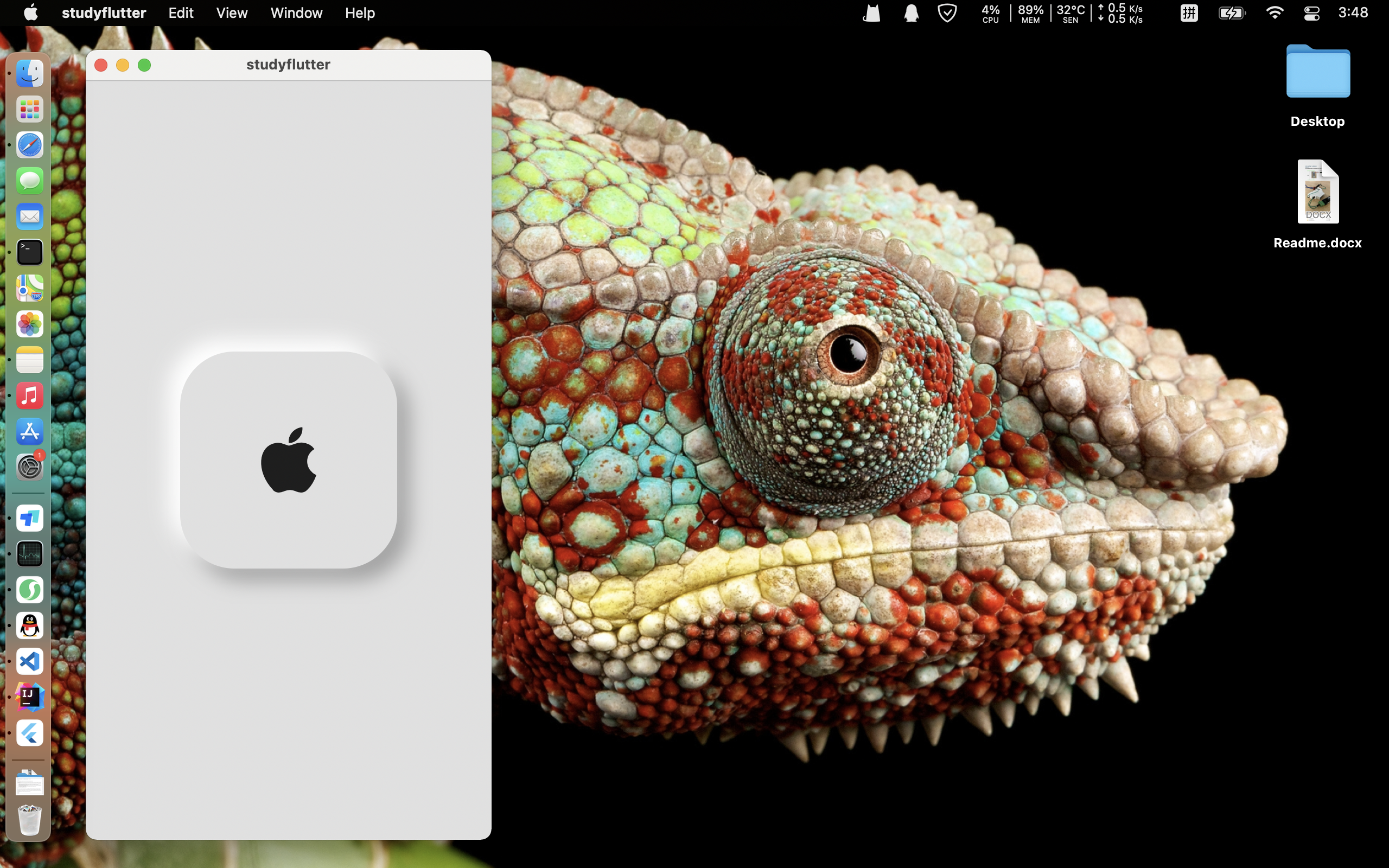
(Flutter) 带阴影的图标
Code
基本的代码框架
这个代码框架是Flutter应用的标准结构,它遵循了一些最佳实践和设计模式。以下是为什么要这么写框架以及这样做的好处:
-
分离关注点:
MyApp类专注于应用的总体配置,如主题、路由等。MyHomePage类专注于具体页面的实现。_MyHomePageState类管理页面的状态。
-
易于维护和扩展:
- 这种结构使得代码更加模块化,每个类都有明确的职责。
- 当需要添加新功能或页面时,可以轻松扩展代码,而不需要修改现有代码。
-
遵循Flutter的最佳实践:
- 使用
StatelessWidget和StatefulWidget来构建应用。 StatefulWidget用于需要管理状态的组件,而StatelessWidget用于不需要管理状态的组件。
- 使用
-
良好的错误处理:
- 通过将状态管理分离到
State类中,可以更容易地处理错误和异常情况。
- 通过将状态管理分离到
-
易于测试:
- 这种结构使得单元测试更加容易,因为每个组件都是独立的,可以单独测试。
-
代码复用:
- 使用
Widget类可以使代码更加模块化,从而提高代码的复用性。
- 使用
-
结构清晰:
- 这种结构清晰地分离了应用的不同部分,使得代码更易于理解和维护。
-
遵循SOLID原则:
- 这种代码结构遵循了SOLID原则中的单一职责原则(Single Responsibility Principle),即每个类应该只负责一件事情。
总之,这种代码框架不仅使代码更加清晰和易于维护,而且还遵循了Flutter的最佳实践和软件工程的原则。这使得代码更加健壮、可靠和可扩展。
import 'package:flutter/material.dart';

void main() {
  runApp(MyApp());
}

class MyApp extends StatelessWidget {
  const MyApp({Key? key}) : super(key: key);

  @override
  Widget build(BuildContext context) {
    return MaterialApp(
      debugShowCheckedModeBanner: false,
      home: MyHomePage(),
    );
  }
}

class MyHomePage extends StatefulWidget {
  const MyHomePage({Key? key}) : super(key: key);

  @override
  State<MyHomePage> createState() => _MyHomePageState();
}

class _MyHomePageState extends State<MyHomePage> {
  @override
  Widget build(BuildContext context) {
    return Scaffold(
      backgroundColor: Colors.grey[300],
      // appBar: AppBar(
      //   title: Text("My First App"),
      //   backgroundColor: Colors.blue,
      // ),
      body: Center(
        child: Container(
          width: 200,
          height: 200,
          //color: Colors.red,
          child: Center(
            child: Icon(
              Icons.apple,
              size: 80,
            ),
          ),
          decoration: BoxDecoration(
            color: Colors.grey[300],
            borderRadius: BorderRadius.circular(50),
            boxShadow: [
              BoxShadow(
                color: Colors.grey,
                offset: Offset(10, 10),
                blurRadius: 15,
                spreadRadius: 1.0,
              ),
              BoxShadow(
                color: Colors.white,
                offset: Offset(-10, -10),
                blurRadius: 15,
                spreadRadius: 1.0,
              ),
            ],
          ),
        ),
      ),
    );
  }
}
效果
升级版 带切换明暗按钮
import 'package:flutter/material.dart';

void main() {
  runApp(MyApp());
}

class MyApp extends StatelessWidget {
  const MyApp({Key? key}) : super(key: key);

  @override
  Widget build(BuildContext context) {
    return MaterialApp(
      debugShowCheckedModeBanner: false,
      home: MyHomePage(),
    );
  }
}

class MyHomePage extends StatefulWidget {
  const MyHomePage({Key? key}) : super(key: key);

  @override
  State<MyHomePage> createState() => _MyHomePageState();
}

class _MyHomePageState extends State<MyHomePage> {
  bool darkMode = false;

  @override
  Widget build(BuildContext context) {
    return Scaffold(
      backgroundColor: darkMode ? Colors.grey[850] : Colors.grey[300],
      body: Center(
        child: Column(
          mainAxisAlignment: MainAxisAlignment.center,
          children: <Widget>[
            Container(
              width: 200,
              height: 200,
              //color: Colors.red,
              //child: Center(
              child: Icon(
                Icons.apple,
                size: 80,
                color: darkMode ? Colors.white:Colors.black,
              ),
              //),
              decoration: BoxDecoration(
                color: darkMode?Colors.grey[850]:Colors.grey[300],
                borderRadius: BorderRadius.circular(50),
                boxShadow: [
                  BoxShadow(
                    color: darkMode?Colors.grey.shade800:Colors.grey.shade900,
                    offset: Offset(10, 10),
                    blurRadius: 15,
                    spreadRadius: 1.0,
                  ),
                  BoxShadow(
                    color: darkMode?Colors.grey.shade900:Colors.grey.shade100,
                    offset: Offset(-10, -10),
                    blurRadius: 15,
                    spreadRadius: 1.0,
                  ),
                ],
              ),
            ),
            SizedBox(height: 20),
            Padding(
              padding: EdgeInsets.only(
                top: 50,
              ),
              child: Row(
                mainAxisAlignment: MainAxisAlignment.center,
                children: [
                  TextButton(
                      onPressed: () {
                        setState(() {
                          darkMode = true;
                        });
                      },
                      child: Text(
                        'Dark',
                        style: TextStyle(color: Colors.white),
                      ),
                      style: TextButton.styleFrom(
                        backgroundColor: Colors.grey[900],
                      )),
                  SizedBox(width: 20),
                  TextButton(
                    onPressed: () {
                      setState(() {
                        darkMode = false;
                      });
                    },
                    child: Text(
                      'Light',
                      style: TextStyle(color: Colors.black),
                    ),
                    style: TextButton.styleFrom(
                      backgroundColor: Colors.grey[100],
                    ),
                  ),
                ],
              ),
            ),
          ],
        ),
      ),
    );
  }
}
License:
CC BY 4.0