(LVGL)案例预览 按钮
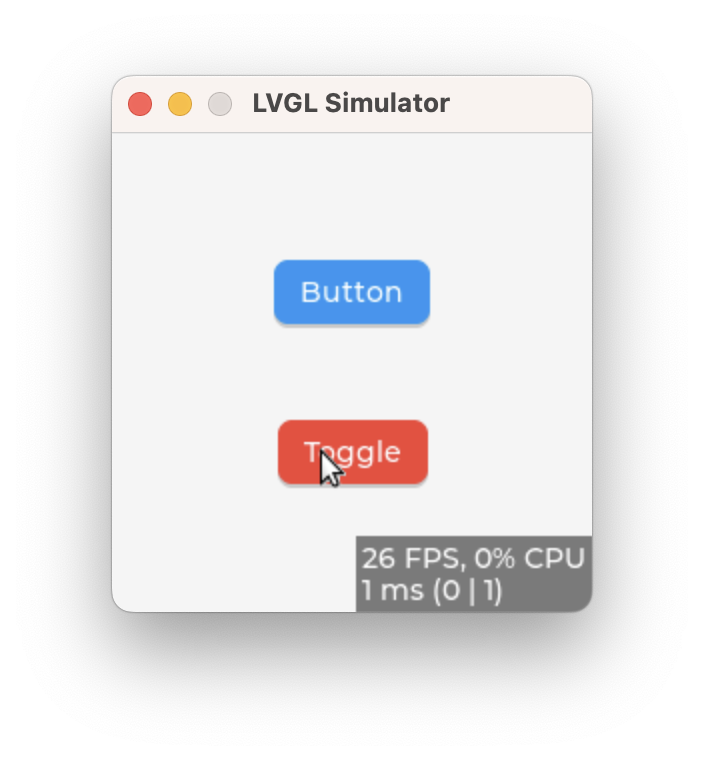
点击一次反转一次颜色的按钮
static void event_handler(lv_event_t * e)
{
    lv_event_code_t code = lv_event_get_code(e);

    if(code == LV_EVENT_CLICKED) {
        LV_LOG_USER("Clicked");
    }
    else if(code == LV_EVENT_VALUE_CHANGED) {
        LV_LOG_USER("Toggled");
    }
}

void lv_example_button_1(void)
{
    lv_obj_t * label;

    lv_obj_t * btn1 = lv_button_create(lv_screen_active());
    lv_obj_add_event_cb(btn1, event_handler, LV_EVENT_ALL, NULL);
    lv_obj_align(btn1, LV_ALIGN_CENTER, 0, -40);
    lv_obj_remove_flag(btn1, LV_OBJ_FLAG_PRESS_LOCK);

    label = lv_label_create(btn1);
    lv_label_set_text(label, "Button");
    lv_obj_center(label);

    lv_obj_t * btn2 = lv_button_create(lv_screen_active());
    lv_obj_add_event_cb(btn2, event_handler, LV_EVENT_ALL, NULL);
    lv_obj_align(btn2, LV_ALIGN_CENTER, 0, 40);
    lv_obj_add_flag(btn2, LV_OBJ_FLAG_CHECKABLE);
    lv_obj_set_height(btn2, LV_SIZE_CONTENT);

    label = lv_label_create(btn2);
    lv_label_set_text(label, "Toggle");
    lv_obj_center(label);

}
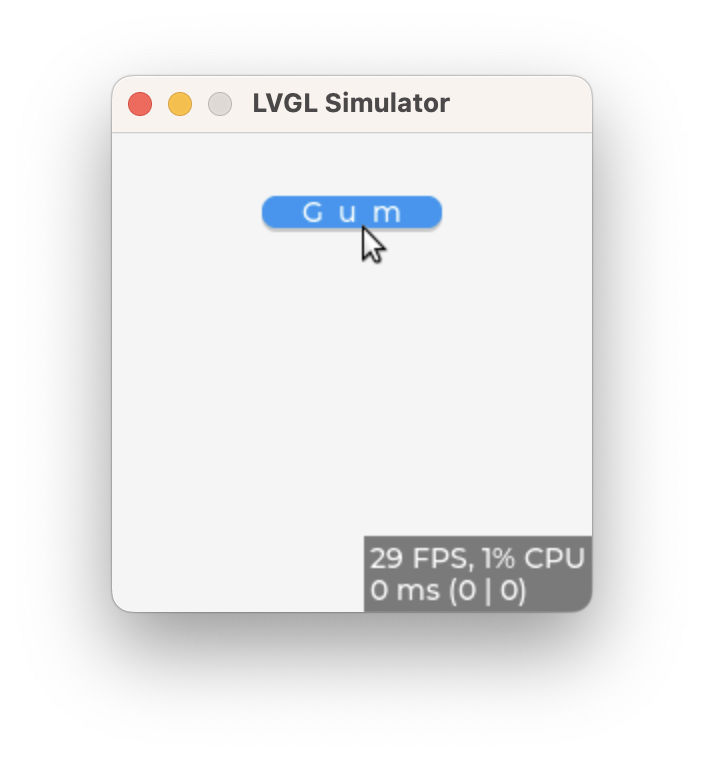
点击一下 Q 弹一下的按钮
/**
 * Create a style transition on a button to act like a gum when clicked
 */
void lv_example_button_3(void)
{
    /*Properties to transition*/
    static lv_style_prop_t props[] = {
        LV_STYLE_TRANSFORM_WIDTH, LV_STYLE_TRANSFORM_HEIGHT, LV_STYLE_TEXT_LETTER_SPACE, 0
    };

    /*Transition descriptor when going back to the default state.
     *Add some delay to be sure the press transition is visible even if the press was very short*/
    static lv_style_transition_dsc_t transition_dsc_def;
    lv_style_transition_dsc_init(&transition_dsc_def, props, lv_anim_path_overshoot, 250, 100, NULL);

    /*Transition descriptor when going to pressed state.
     *No delay, go to presses state immediately*/
    static lv_style_transition_dsc_t transition_dsc_pr;
    lv_style_transition_dsc_init(&transition_dsc_pr, props, lv_anim_path_ease_in_out, 250, 0, NULL);

    /*Add only the new transition to he default state*/
    static lv_style_t style_def;
    lv_style_init(&style_def);
    lv_style_set_transition(&style_def, &transition_dsc_def);

    /*Add the transition and some transformation to the presses state.*/
    static lv_style_t style_pr;
    lv_style_init(&style_pr);
    lv_style_set_transform_width(&style_pr, 10);
    lv_style_set_transform_height(&style_pr, -10);
    lv_style_set_text_letter_space(&style_pr, 10);
    lv_style_set_transition(&style_pr, &transition_dsc_pr);

    lv_obj_t * btn1 = lv_button_create(lv_screen_active());
    lv_obj_align(btn1, LV_ALIGN_CENTER, 0, -80);
    lv_obj_add_style(btn1, &style_pr, LV_STATE_PRESSED);
    lv_obj_add_style(btn1, &style_def, 0);

    lv_obj_t * label = lv_label_create(btn1);
    lv_label_set_text(label, "Gum");
}
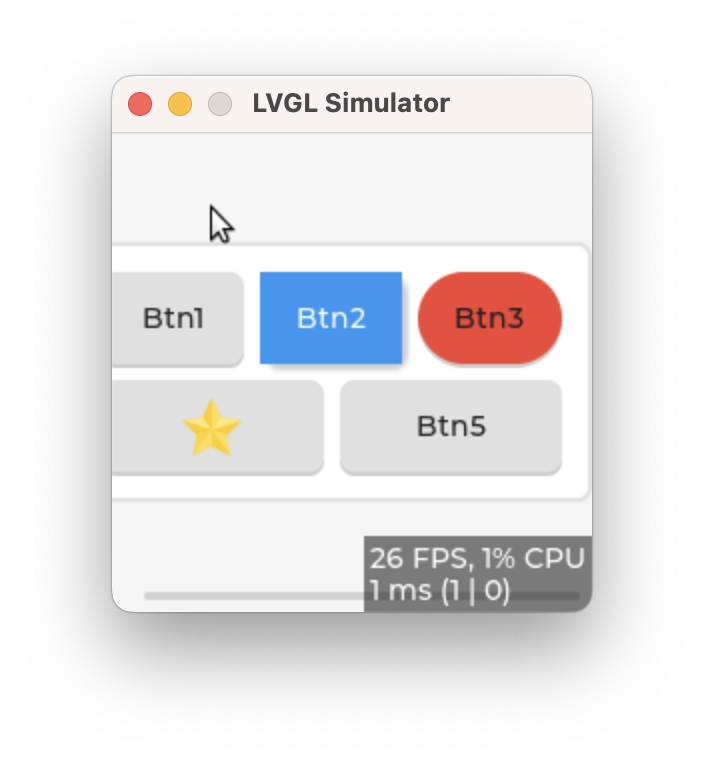
通过 event 创建的按钮组
static void event_cb(lv_event_t * e)
{
    lv_obj_t * obj = lv_event_get_target_obj(e);
    lv_draw_task_t * draw_task = lv_event_get_draw_task(e);
    lv_draw_dsc_base_t * base_dsc = (lv_draw_dsc_base_t *)lv_draw_task_get_draw_dsc(draw_task);
    /*When the button matrix draws the buttons...*/
    if(base_dsc->part == LV_PART_ITEMS) {
        bool pressed = false;
        if(lv_buttonmatrix_get_selected_button(obj) == base_dsc->id1 && lv_obj_has_state(obj, LV_STATE_PRESSED)) {
            pressed = true;
        }

        /*Change the draw descriptor of the 2nd button*/
        if(base_dsc->id1 == 1) {
            lv_draw_fill_dsc_t * fill_draw_dsc = lv_draw_task_get_fill_dsc(draw_task);
            if(fill_draw_dsc) {
                fill_draw_dsc->radius = 0;
                if(pressed) fill_draw_dsc->color = lv_palette_darken(LV_PALETTE_BLUE, 3);
                else fill_draw_dsc->color = lv_palette_main(LV_PALETTE_BLUE);
            }
            lv_draw_box_shadow_dsc_t * box_shadow_draw_dsc = lv_draw_task_get_box_shadow_dsc(draw_task);
            if(box_shadow_draw_dsc) {
                box_shadow_draw_dsc->width = 6;
                box_shadow_draw_dsc->ofs_x = 3;
                box_shadow_draw_dsc->ofs_y = 3;
            }
            lv_draw_label_dsc_t * label_draw_dsc = lv_draw_task_get_label_dsc(draw_task);
            if(label_draw_dsc) {
                label_draw_dsc->color = lv_color_white();
            }

        }
        /*Change the draw descriptor of the 3rd button*/
        else if(base_dsc->id1 == 2) {
            lv_draw_fill_dsc_t * fill_draw_dsc = lv_draw_task_get_fill_dsc(draw_task);
            if(fill_draw_dsc) {
                fill_draw_dsc->radius = LV_RADIUS_CIRCLE;
                if(pressed) fill_draw_dsc->color = lv_palette_darken(LV_PALETTE_RED, 3);
                else fill_draw_dsc->color = lv_palette_main(LV_PALETTE_RED);
            }

            lv_draw_box_shadow_dsc_t * box_shadow_draw_dsc = lv_draw_task_get_box_shadow_dsc(draw_task);
            if(box_shadow_draw_dsc) {
                box_shadow_draw_dsc->radius = LV_RADIUS_CIRCLE;
            }
        }
        else if(base_dsc->id1 == 3) {
            lv_draw_label_dsc_t * label_draw_dsc = lv_draw_task_get_label_dsc(draw_task);
            if(label_draw_dsc) {
                label_draw_dsc->opa = 0;
            }
            if(lv_draw_task_get_type(draw_task) == LV_DRAW_TASK_TYPE_FILL) {
                LV_IMAGE_DECLARE(img_star);
                lv_image_header_t header;
                lv_result_t res = lv_image_decoder_get_info(&img_star, &header);
                if(res != LV_RESULT_OK) return;

                lv_area_t a;
                a.x1 = 0;
                a.x2 = header.w - 1;
                a.y1 = 0;
                a.y2 = header.h - 1;
                lv_area_t draw_task_area;
                lv_draw_task_get_area(draw_task, &draw_task_area);
                lv_area_align(&draw_task_area, &a, LV_ALIGN_CENTER, 0, 0);

                lv_draw_image_dsc_t img_draw_dsc;
                lv_draw_image_dsc_init(&img_draw_dsc);
                img_draw_dsc.src = &img_star;
                img_draw_dsc.recolor = lv_color_black();
                if(pressed) img_draw_dsc.recolor_opa = LV_OPA_30;

                lv_draw_image(base_dsc->layer, &img_draw_dsc, &a);

            }
        }
    }
}

/**
 * Add custom drawer to the button matrix to customize buttons one by one
 */
void lv_example_buttonmatrix_2(void)
{
    lv_obj_t * btnm = lv_buttonmatrix_create(lv_screen_active());
    lv_obj_add_event_cb(btnm, event_cb, LV_EVENT_DRAW_TASK_ADDED, NULL);
    lv_obj_add_flag(btnm, LV_OBJ_FLAG_SEND_DRAW_TASK_EVENTS);
    lv_obj_center(btnm);
}
点击一次反转一次颜色的按钮
static void event_cb(lv_event_t * e)
{
    lv_obj_t * obj = lv_event_get_target_obj(e);
    uint32_t id = lv_buttonmatrix_get_selected_button(obj);
    bool prev = id == 0;
    bool next = id == 6;
    if(prev || next) {
        /*Find the checked button*/
        uint32_t i;
        for(i = 1; i < 7; i++) {
            if(lv_buttonmatrix_has_button_ctrl(obj, i, LV_BUTTONMATRIX_CTRL_CHECKED)) break;
        }

        if(prev && i > 1) i--;
        else if(next && i < 5) i++;

        lv_buttonmatrix_set_button_ctrl(obj, i, LV_BUTTONMATRIX_CTRL_CHECKED);
    }
}

/**
 * Make a button group (pagination)
 */
void lv_example_buttonmatrix_3(void)
{
    static lv_style_t style_bg;
    lv_style_init(&style_bg);
    lv_style_set_pad_all(&style_bg, 0);
    lv_style_set_pad_gap(&style_bg, 0);
    lv_style_set_clip_corner(&style_bg, true);
    lv_style_set_radius(&style_bg, LV_RADIUS_CIRCLE);
    lv_style_set_border_width(&style_bg, 0);

    static lv_style_t style_btn;
    lv_style_init(&style_btn);
    lv_style_set_radius(&style_btn, 0);
    lv_style_set_border_width(&style_btn, 1);
    lv_style_set_border_opa(&style_btn, LV_OPA_50);
    lv_style_set_border_color(&style_btn, lv_palette_main(LV_PALETTE_GREY));
    lv_style_set_border_side(&style_btn, LV_BORDER_SIDE_INTERNAL);
    lv_style_set_radius(&style_btn, 0);

    static const char * map[] = {LV_SYMBOL_LEFT, "1", "2", "3", "4", "5", LV_SYMBOL_RIGHT, ""};

    lv_obj_t * btnm = lv_buttonmatrix_create(lv_screen_active());
    lv_buttonmatrix_set_map(btnm, map);
    lv_obj_add_style(btnm, &style_bg, 0);
    lv_obj_add_style(btnm, &style_btn, LV_PART_ITEMS);
    lv_obj_add_event_cb(btnm, event_cb, LV_EVENT_VALUE_CHANGED, NULL);
    lv_obj_set_size(btnm, 225, 35);

    /*Allow selecting on one number at time*/
    lv_buttonmatrix_set_button_ctrl_all(btnm, LV_BUTTONMATRIX_CTRL_CHECKABLE);
    lv_buttonmatrix_clear_button_ctrl(btnm, 0, LV_BUTTONMATRIX_CTRL_CHECKABLE);
    lv_buttonmatrix_clear_button_ctrl(btnm, 6, LV_BUTTONMATRIX_CTRL_CHECKABLE);

    lv_buttonmatrix_set_one_checked(btnm, true);
    lv_buttonmatrix_set_button_ctrl(btnm, 1, LV_BUTTONMATRIX_CTRL_CHECKED);

    lv_obj_center(btnm);

}
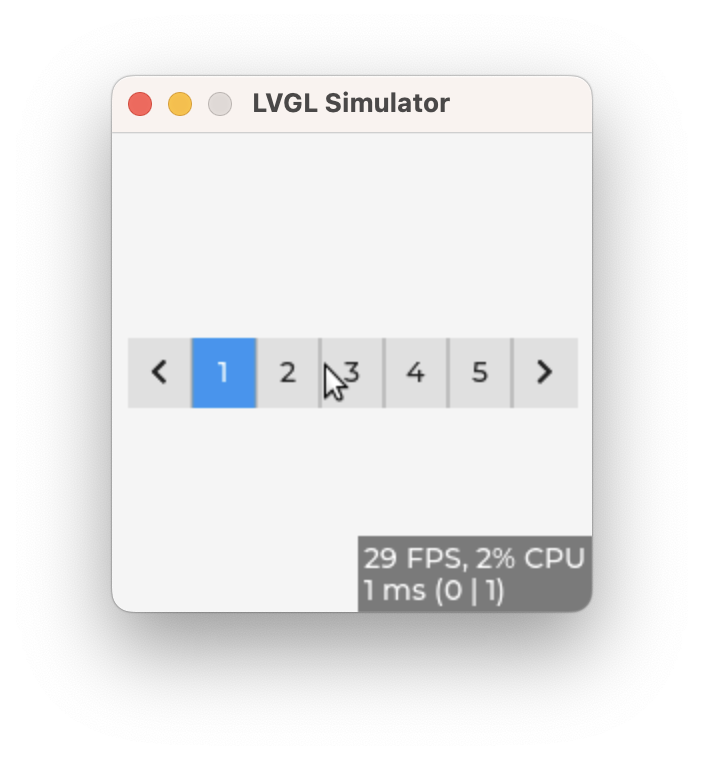
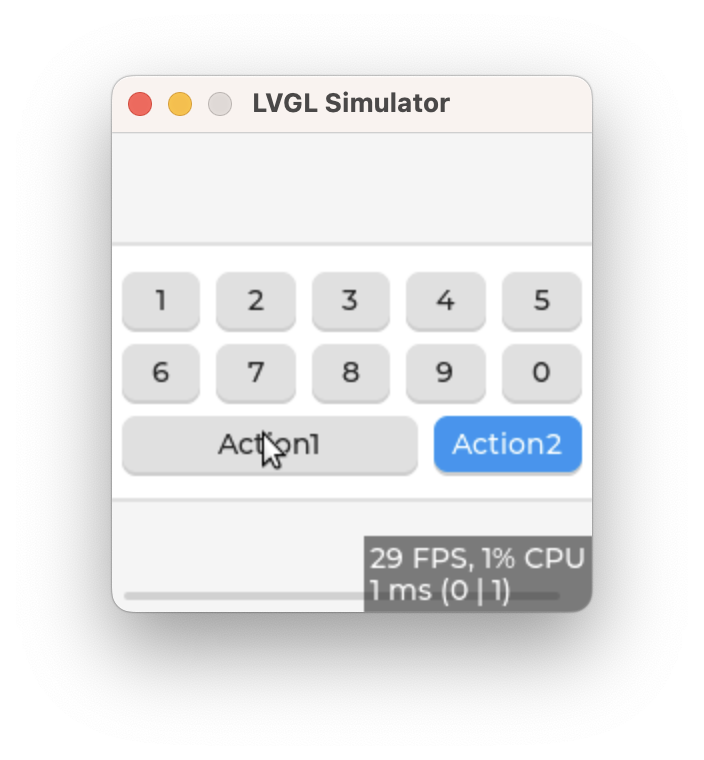
用 map 批量创建按钮组
static void event_handler(lv_event_t * e)
{
    lv_event_code_t code = lv_event_get_code(e);
    lv_obj_t * obj = lv_event_get_target_obj(e);
    if(code == LV_EVENT_VALUE_CHANGED) {
        uint32_t id = lv_buttonmatrix_get_selected_button(obj);
        const char * txt = lv_buttonmatrix_get_button_text(obj, id);
        LV_UNUSED(txt);
        LV_LOG_USER("%s was pressed\n", txt);
    }
}

static const char * btnm_map[] = {"1", "2", "3", "4", "5", "\n",
                                  "6", "7", "8", "9", "0", "\n",
                                  "Action1", "Action2", ""
                                 };

void lv_example_buttonmatrix_1(void)
{
    lv_obj_t * btnm1 = lv_buttonmatrix_create(lv_screen_active());
    lv_buttonmatrix_set_map(btnm1, btnm_map);
    lv_buttonmatrix_set_button_width(btnm1, 10, 2);        /*Make "Action1" twice as wide as "Action2"*/
    lv_buttonmatrix_set_button_ctrl(btnm1, 10, LV_BUTTONMATRIX_CTRL_CHECKABLE);
    lv_buttonmatrix_set_button_ctrl(btnm1, 11, LV_BUTTONMATRIX_CTRL_CHECKED);
    lv_obj_align(btnm1, LV_ALIGN_CENTER, 0, 0);
    lv_obj_add_event_cb(btnm1, event_handler, LV_EVENT_ALL, NULL);
}
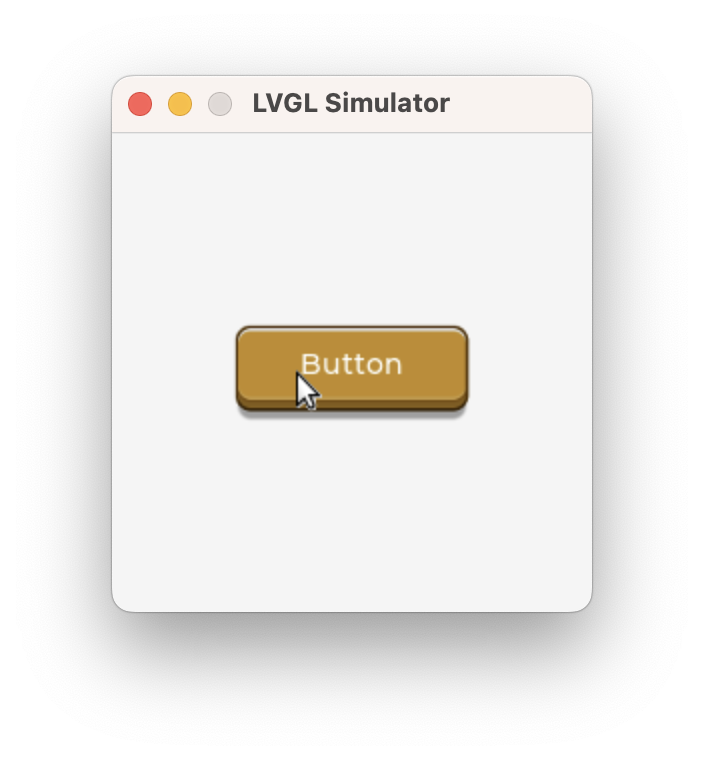
图片按钮
void lv_example_imagebutton_1(void)
{
    LV_IMAGE_DECLARE(imagebutton_left);
    LV_IMAGE_DECLARE(imagebutton_right);
    LV_IMAGE_DECLARE(imagebutton_mid);

    /*Create a transition animation on width transformation and recolor.*/
    static lv_style_prop_t tr_prop[] = {LV_STYLE_TRANSFORM_WIDTH, LV_STYLE_IMAGE_RECOLOR_OPA, 0};
    static lv_style_transition_dsc_t tr;
    lv_style_transition_dsc_init(&tr, tr_prop, lv_anim_path_linear, 200, 0, NULL);

    static lv_style_t style_def;
    lv_style_init(&style_def);
    lv_style_set_text_color(&style_def, lv_color_white());
    lv_style_set_transition(&style_def, &tr);

    /*Darken the button when pressed and make it wider*/
    static lv_style_t style_pr;
    lv_style_init(&style_pr);
    lv_style_set_image_recolor_opa(&style_pr, LV_OPA_30);
    lv_style_set_image_recolor(&style_pr, lv_color_black());
    lv_style_set_transform_width(&style_pr, 20);

    /*Create an image button*/
    lv_obj_t * imagebutton1 = lv_imagebutton_create(lv_screen_active());
    lv_imagebutton_set_src(imagebutton1, LV_IMAGEBUTTON_STATE_RELEASED, &imagebutton_left, &imagebutton_mid,
                           &imagebutton_right);
    lv_obj_add_style(imagebutton1, &style_def, 0);
    lv_obj_add_style(imagebutton1, &style_pr, LV_STATE_PRESSED);

    lv_obj_set_width(imagebutton1, 100);
    lv_obj_align(imagebutton1, LV_ALIGN_CENTER, 0, 0);

    /*Create a label on the image button*/
    lv_obj_t * label = lv_label_create(imagebutton1);
    lv_label_set_text(label, "Button");
    lv_obj_align(label, LV_ALIGN_CENTER, 0, -4);
}
License:
CC BY 4.0